Dados necessários para melhorar nosso serviço e personalizar a sua experiência.


Learn how to make a pre-filled Income Tax declaration in 7 steps
The newspaper Folha de S.Paulo published a report that answers questions about the Income Tax declaration. Dr. Daniel Serra Lima, partner in the Tax Law area at Maneira Advogados, was consulted to talk about the topic.

Learn how to make a pre-filled Income Tax declaration in 7 steps
Template contains some information already filled in, which facilitates accountability by May 31st
Cristiane Gercina
Patrick Fuentes
SÃO PAULO
(Image: Gabriel Cabral/Folhapress)
Taxpayers required to declare their 2023 Income Tax can count on the pre-filled declaration, which facilitates reporting to the Federal Revenue. The deadline to submit the document is at 11:59 pm on May 31st.
Whoever is required to declare and is late pays a fine. The minimum amount is R$165.74, but it can reach 20% of the tax due for the year. This year, 22% of taxpayers have already sent their IR using the pre-filled template.
The Folha report today shows, in seven steps, how to access the pre-filled declaration, check the data contained in it and send the IR.
STEP-BY-STEP PRE-FILLED DECLARATION
STEP 1: CHOOSE WHERE TO MAKE THE PRE-FILLED DECLARATION
There are three ways to access the pre-filled IR declaration: through the declaration generating program, which must be downloaded to the computer; online, in My Income Tax, through e-CAC or Portal Gov.br; and through the My Income Tax app for cell phones and tablets.
Those who will access the declaration via computer must download the program on the Federal Revenue website step). Anyone who chooses to do the IR online will need to have a gov.br password to access the declaration through the portal of the same name or through e-CAC. (Click here to find out how to create your password).
In the case of the app, simply download it from your cell phone's app store. To access, however, the gov.br password is also required.
STEP 2: LEARN HOW TO START THE PRE-FILLED DECLARATION
In the IR generator program:
- Open the IRPF 2023 and click on “New”
- Choose annual adjustment statement
- Go to the option “Start declaration from the pre-filled one”
- Inform that this is your own declaration and click OK
- The system will ask for the gov.br password; new tab will open
- Enter CPF and password
- Then you will be directed to the declaration
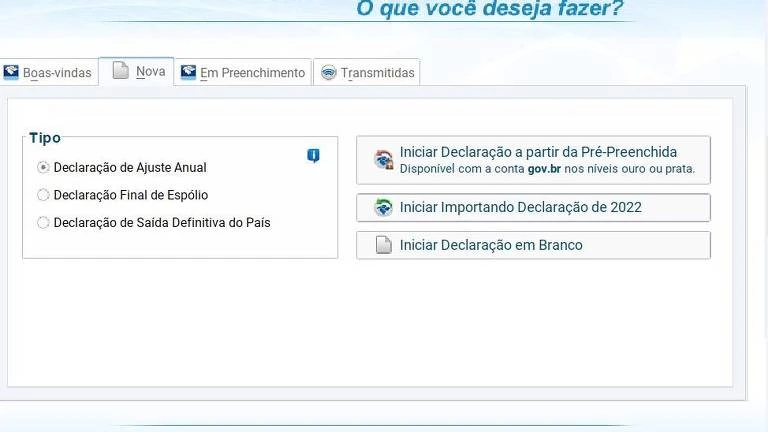
No e-CAC:
- Access the e-CAC Portal
- Click on “Enter with gov.br”
- Enter CPF and password
- Then, in the menu on the left, click on “My Income Tax”
- On the next page, click on “IRPF 2023”
- Then go to “Fill out declaration”
No gov.br
- Access the gov.br Portal
- In the box where it says “Highlights”, click on “Deliver My Income Tax (DIRPF)”
- Then go to “Start”
- The page will be redirected to the “My Income Tax” home screen
- On the next page, click on IRPF 2023
- Then go to “Fill out declaration”
STEP 3: CHECK TAXPAYER INFORMATION
This declaration form contains personal data such as name, address, telephone number, email, nature of occupation, whether you have a chronic illness or disability and whether you have a spouse or partner.
The delivery receipt number for the previous year's declaration must also be filled in. When filling out online, there is also the NIT, NIS or PIS number and a tab called “Family”, where you can enter dependents.
Sandro Rodrigues, accounting economist and founder of Attend Contabilidade, warns that the pre-filled declaration does not provide income for dependents, so it is necessary to pay attention to this point.
STEP 4: SEE IF THE COMPANY REPORTED ITS TAXABLE INCOME CORRECTLY
These forms contain information regarding taxpayers' income. The main ones are “Taxable Income Received from Companies” and “Taxable Income Received from Individuals/Abroad”. Income is separated according to the source of payment, whether taxable, exempt or from exclusive or definitive taxation.
All income received during the year must be reported to the Federal Revenue Service, including salary, retirement and rents. It is important to check that the values reported correspond to payslips, income reports and invoices.
If any value is incorrect, simply select it, click edit and make the changes to correct it according to the income reports you received from paying sources.
STEP 5: INSERT, EDIT OR DELETE DATA IN THE PAYMENTS MADE FORM
The “Payments Made” tab contains amounts paid by the taxpayer to service providers that can be deducted in the declaration. The most important of these is the health plan, but information from medical or dental clinics, schools and a PGBL-type private pension plan may also be included.
Check all amounts, especially expenses related to education and health of the taxpayer and their dependents. If there is any expense that was included in the 2022 IR, but was no longer used in 2023, delete it.
The amounts are the responsibility of the taxpayer. Only declare if you actually have a document proving the expense. consultant Daniel Serra Lima, tax lawyer and accountant at Maneira Advogados, states that a simple receipt is not always taken as proof. You must have proof that you paid for the expense.
STEP 6: INFORM YOUR ASSETS, BANK ACCOUNTS AND INVESTMENTS
Another form that must contain information already filled in is the “Assets and Rights”. It lists properties that the taxpayer owns, a car, some investments and bank accounts. Current and savings accounts with a bank balance from R$140 on 12/31/2022 must be declared.
Rodrigues, from Attend, explains that, in the case of some investments made in banks, the data is detailed in the declaration. "It was common to put, hypothetically, 'applications at Banco Itaú' and the total value. Now, the bank divides application by application, entity by entity. It has to be very careful to exclude what is wrong or duplicated", he states.
In the online declaration, the assets and rights form comes together with the debts form. Only debts above R$5,000 must be reported. Smaller amounts will only be included in the declaration if the taxpayer deems it necessary.
STEP 7: CHECK THE INFORMATION AGAIN AND SEND THE INCOME TAX
After checking all the information in the pre-filled declaration, the taxpayer must go to the “Declaration Summary” form, which will contain information on income and deductions, and tax calculation.
In the generating program, on the computer, the taxpayer must choose, on the left, the form of taxation, whether by legal deductions or by the simplified discount. The program makes the calculation and the citizen only needs to choose what is best, guaranteeing a greater refund or lower tax to be paid.
You can also click on “Check pending issues”. Pending issues in red prevent the declaration from being sent and must be corrected. Those in yellow do not bar shipping.
If everything is correct, click on the “Submit declaration” option. After clicking on this option, the taxpayer will be directed to a page where bank details will be requested to receive the refund or the Pix number for payment.
It is only possible to receive Pix from those who have their CPF as their key. Choosing this payment method also brings an advantage when it comes to receiving the refund, as it puts the taxpayer in the priority queue.
Whoever is going to pay tax must issue the Darf (Federal Revenue Collection Document).
When submitting, save the receipt and a copy of the declaration on your computer or the device you are using.
See other related news stories

Press
Aumento da base do ICMS pode se tornar a primeira grande disputa da reforma tributária
October 1, 2026A Emenda Constitucional n° 32, que abriu caminho para a reforma tributária do consumo, e a LC 227, a segunda mais importante que regulamentou o novo sistema, determinam expressamente que o novo IS (Imposto Seletivo) entra na base de cálculo...

Press
Inheritance: how to find out if there are debts to pay and how to negotiate?
July 29, 2026Inheritance: how to find out if there are debts to be paid and how to negotiate? July 29, 2026 By Fabiana Holtz Image: Freepik São Paulo – The discussion about the division of an inheritance (also called (estate) always raises a noisy and often...